I built an AI-powered CI/CD pipeline that manages itself
Contents
Before Pelaris, I spent years deploying AI at enterprise scale. Hundreds of applications, global infrastructure, service management platforms handling millions of interactions. One of the most effective things we built wasn’t a model. It was automated triage and resolution pipelines: systems that could detect an issue, research it, classify it, route it, and in many cases resolve it before a human ever looked at it.
Virtual agent deflection went from 18% to 94%. Mean time to resolution dropped by a full day within two months. Those aren’t marginal improvements. They’re structural changes to how work gets done.
When I started building Pelaris, an AI-powered endurance coaching platform, I kept coming back to that same question. What if the same principles applied to software development itself? Not just the deployment, but the entire cycle, from someone reporting something to code shipping.
This is what I built, how it works, and what I learned.
The architecture
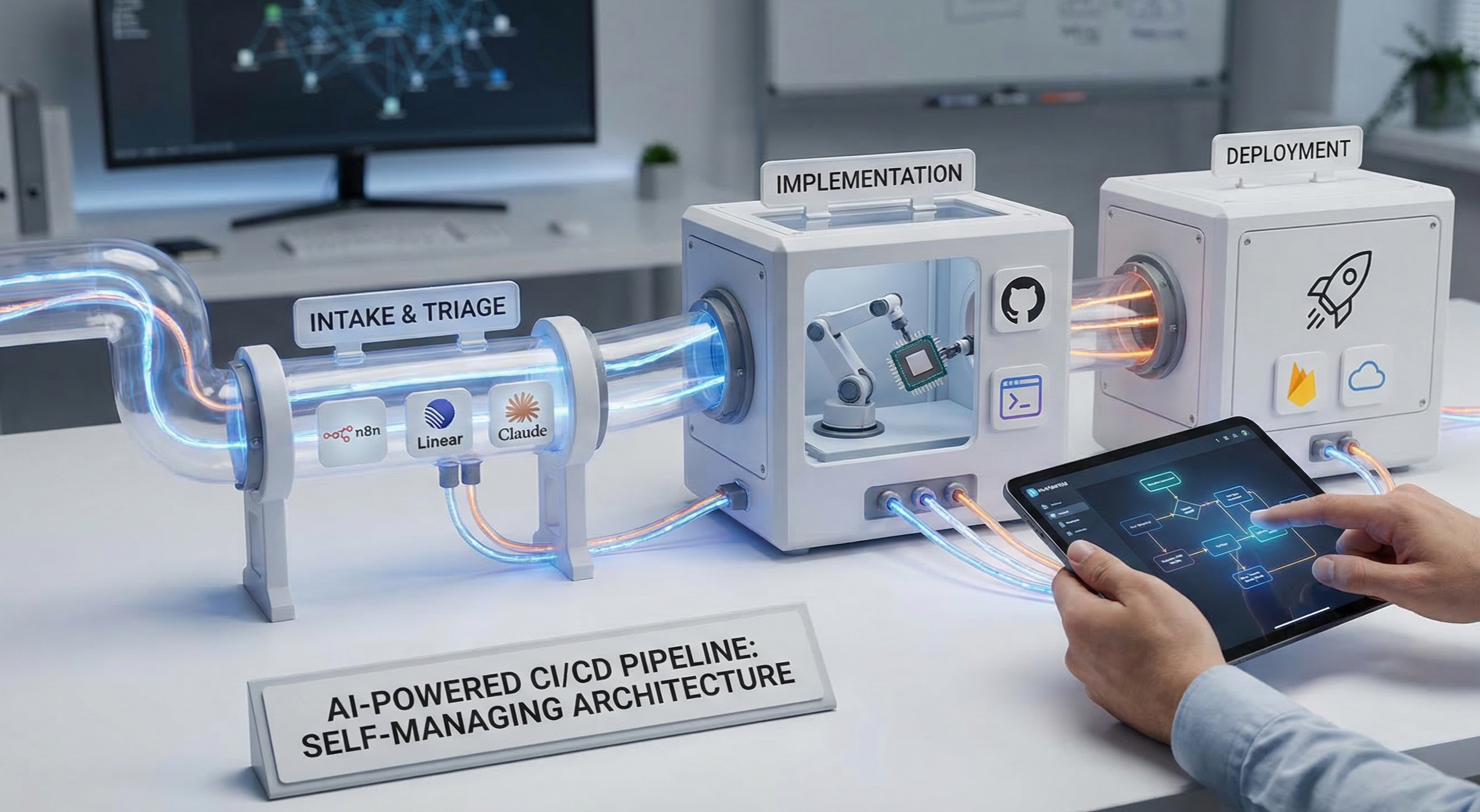
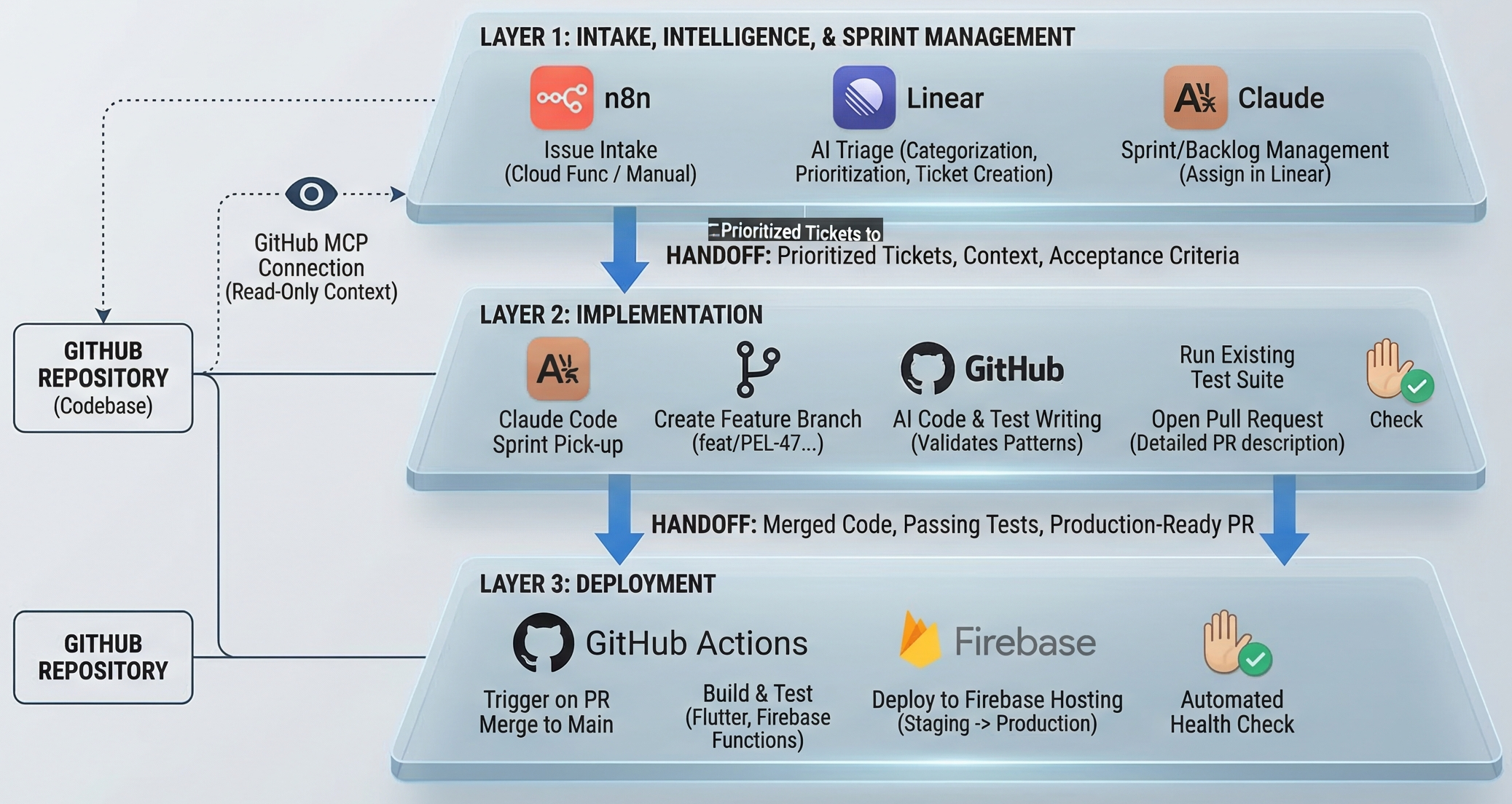
The pipeline has three layers that hand off sequentially.
- Layer 1: Intake, intelligence, and sprint management (n8n + Linear + Claude)
- Layer 2: Implementation (Claude Code + GitHub)
- Layer 3: Deployment (GitHub Actions + Firebase)
Each layer has a clear job. None of them overlap.
Layer 1: From idea to sprint-ready ticket
Intake
Issues enter the system two ways. Users submit feedback directly from within Pelaris, which hits a Cloud Function that formats and writes to a queue. I log things in Linear when I’m working and notice something - a bug, a product idea, a technical debt item.
Both paths land in the same place: a Linear issue in an unprocessed state.
The triage agent
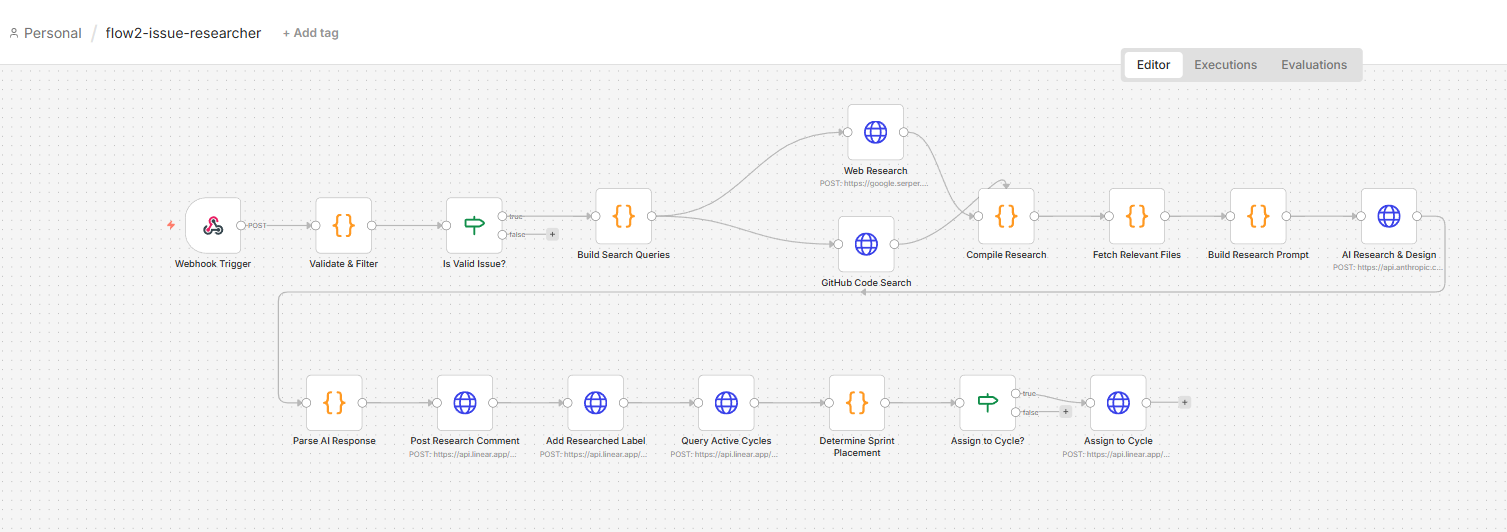
When a new issue arrives, it triggers an n8n flow that dispatches to the triage workflow. The agent does five things, in sequence.
1. Reads the codebase via GitHub MCP
This is the part that makes everything else work well. The agent connects to the Pelaris GitHub repository through the Model Context Protocol, which gives Claude structured access to the actual codebase. It’s not pattern-matching on keywords. It reads the relevant files, understands existing implementation patterns, checks whether something similar already exists, identifies what would need to change.
The prompt scopes the reads deliberately, relevant files, adjacent tests, downstream dependencies. Without that scoping, the agent reads too broadly and produces tickets that overestimate complexity.
2. Categorises and prioritises
Using the codebase context alongside the issue description, Claude classifies the issue: bug, feature, tech debt, or infrastructure. It assigns a priority based on user impact, implementation complexity, and whether it’s blocking something else.
The prioritisation logic is tuned for where Pelaris is right now. Anything blocking a user from completing a core training flow is P0. Performance degradation on mobile is P1. New features that don’t unblock retention are P2 or below. These aren’t defaults, they’re specific decisions baked into the prompt, calibrated over a number of iterations.
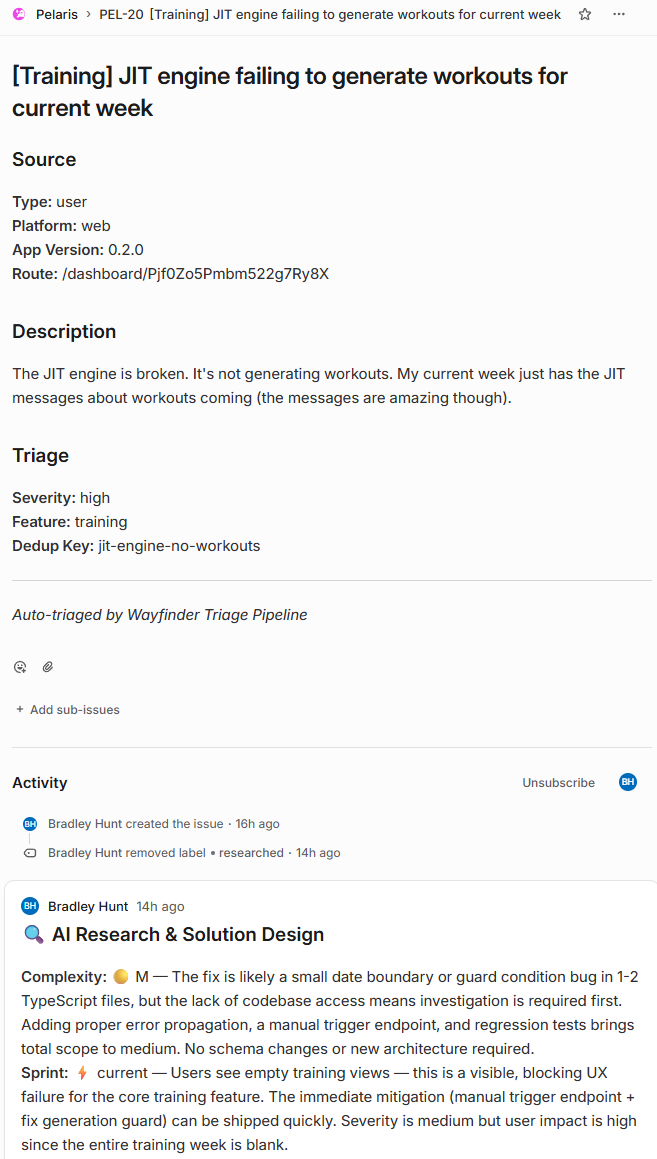
3. Writes a structured ticket
The agent rewrites the original issue, which might be two lines of user feedback or a half-formed thought at 11pm, into a structured ticket:
- Clear problem statement
- Proposed implementation approach
- Files likely affected
- Acceptance criteria
- Estimated complexity
The quality is consistently good. More importantly, it’s consistent. Every ticket arrives in the same format, with the same level of detail, regardless of how the original issue was logged.
4. Assigns to sprint or backlog
The agent queries the current active sprint in Linear. If the issue’s category and priority match the sprint’s focus, it gets pulled in. If not, it goes to the backlog with appropriate labels. The logic is intentionally conservative, better to underutilise a sprint than overcommit one.
5. Posts a summary comment
Before handing off, the agent posts a comment to the Linear issue: what it found in the codebase, why it categorised the issue the way it did, confidence level. This isn’t just for my review. The implementation agent reads this comment later. The research done in Layer 1 carries forward into Layer 2.
Layer 2: Implementation
Claude Code picks up the sprint
When a sprint runs, Claude Code receives the sprint context: all tickets, their descriptions, the codebase analysis from triage, and the acceptance criteria.
It works through the sprint sequentially, one ticket at a time.
Branch and scope
Claude Code creates a feature branch from main using the ticket identifier and a slug from the title. feat/PEL-47-session-card-logging, for example. Consistent naming matters because the GitHub Action reads it.
Implementation
Claude Code reads the triage agent’s codebase analysis first. This handoff is the key design decision: the research from Layer 1 doesn’t get discarded. Claude Code gets the full context, which files are relevant, what the existing patterns look like, what the acceptance criteria require.
For bugs, it identifies the root cause and fixes it. For features, it implements against the acceptance criteria. For refactors, it makes the change and validates it hasn’t broken adjacent functionality.
The implementation prompt includes explicit rules about the codebase, don’t change patterns without a reason, don’t remove comments, use the existing ID generation conventions. These are things I’ve burned myself on before and encoded as constraints.
Testing
Claude Code runs the existing test suite after each change. If tests fail, it attempts to fix the implementation rather than the test, unless the test is clearly wrong. If it can’t resolve the failure after two attempts, it flags the ticket and moves on. That ticket comes back to me with a clear failure report.
For new features, it writes tests that match the style of the existing test suite.
Pull request
Once implementation and tests pass, Claude Code opens a PR against main. The PR description includes: link to the Linear ticket, summary of what changed and why, files modified, test results, and any caveats or things worth manual verification.
I review these. Most PRs I approve without changes. Some I push back on with a comment, which feeds back into the cycle. The human judgment doesn’t disappear, it gets applied at the right moment, not distributed across every step.
Layer 3: GitHub Actions
When a PR merges to main, the GitHub Action runs:
- Install dependencies
- Full test suite
- Flutter web build
- Deploy to Firebase Hosting - staging first, then production after a health check window
If any step fails, it posts back to the Linear issue with the failure details. The issue gets re-opened and labelled for human review.
The staging-to-production gap is deliberate. It’s caught regressions that the test suite missed. Automated health checking against the staging environment has a better hit rate than manual spot-checking under time pressure.
What the MCP integration actually changes
The GitHub MCP connection is worth unpacking, because it’s the part that elevates this from “an AI writing tickets” to something genuinely useful.
Without it, the triage agent works from the issue description alone. It can make educated guesses about impact and complexity, but it’s reasoning from text, not from code. The recommendations are generic.
With it, the agent reads the actual files. It finds the specific function that’s likely broken. It sees that a similar feature was implemented six months ago using a pattern the new feature should match. It notices the test for the affected component is missing an edge case. It identifies that fixing the bug in the reported file will also require updating a downstream service.
That’s not summarising a bug report with a language model. That’s code comprehension, and it changes the quality of the output significantly.
Where AI still needs help
This pipeline works well when the problem is clear and the codebase context is sufficient. Where it needs more guidance:
Ambiguous intent
When a user reports “the training session feels off,” the triage agent can classify and prioritise, but interpreting what “off” means still benefits from human context. The agent makes a reasonable guess and flags its confidence level. Low-confidence tickets get a different review workflow.
Cross-cutting changes
Features that touch multiple layers of the stack, a schema change that cascades through Cloud Functions, Firestore, and the Flutter client simultaneously, require tighter scoping guidance than the general prompt provides. I’m still refining how to handle dependency chains cleanly.
Style consistency
Claude Code’s implementation is functionally correct more reliably than it is stylistically consistent. It occasionally makes a change that’s technically right but doesn’t match the surrounding code’s conventions closely enough. The fix is tighter style guidance in the implementation prompt, and better test coverage that catches style regressions. This is an area where the prompt and the codebase documentation are doing a lot of the work and improving both is an ongoing process.
The honest characterisation: the pipeline handles the predictable parts of development well. The parts that require judgment, taste, or interpretation of ambiguous requirements still need a human in the loop at the right moments. That’s not a gap in the architecture. It’s the correct boundary.
What this changes, practically
The sprint management layer returns three to four hours a week because project management at speed has overhead that compounds. Triage, ticket writing, sprint planning, priority calls. When those decisions are right 80% of the time without my involvement, and I handle the 20% that needs judgment, those hours go back into building.
The implementation layer is harder to quantify because the counterfactual isn’t “I would have written this code myself in the same time.” The counterfactual is “I would have had to choose between this and something else this week.” Claude Code expands what’s buildable in a sprint, not just how fast a given piece gets built.
The compounding effect is the interesting part. Each sprint, the codebase gets more test coverage, clearer patterns, better documentation. The next sprint’s agents have better material to work from. The pipeline gets marginally better at its own job.
The pattern is the same one that makes automated triage work in enterprise service management, a support model AI is now forcing to change. Remove the noise. The people left in the loop get better work, not less work. The pipeline doesn’t replace the engineering judgment. It handles the parts that don’t require it, which turns out to be a significant portion of the cycle.
What to take from this
The architecture isn’t complex. It’s a sequence of well-scoped AI agents, each with clear inputs and outputs, connected by webhooks. The agents don’t need to be clever. They need to be well-prompted, well-scoped, and connected to the right context.
The MCP integration with GitHub is the thing I’d prioritise if building something similar. Giving the agent real access to your codebase, not a description of it, is what makes the difference between a novelty and something that earns its place.
Linear as the coordination layer was the right call. It’s the connective tissue between intake, triage, implementation, and review. Every stage writes to it. Every stage reads from it.
n8n for the orchestration layer: self-hosted, flexible, and transparent about what’s happening at each step. When something breaks, you can see exactly where.
The underlying principle is the same one that drove the enterprise results I mentioned earlier. Remove the work that doesn’t require human judgment. Apply human judgment where it actually matters. The system gets faster. The work gets better.
Building Pelaris solo means I need the operational capacity of a small team. This pipeline doesn’t replace that team. It handles the parts of the job that don’t require me, and that’s enough to make the difference.
Read next
Bradley Hunt
AI, engineering & leadership